Shopify Traffic But No Sales? Check the Ads, the Website and the Product, in This Order
Visitors but no orders? Three numbers in Meta Ads Manager tell you in minutes if the problem is your ads, your website or your product, with real benchmarks.


Someone sent me this message: “I’ve spent $5,000 on ads and I still can’t get a single order. I only have $100 left. Can you help?”
If you’re running ads, people visit your store and you still have no sales, it’s almost always one of three things: the ads, the website or the product. And there’s one number in Ads Manager that tells you in a few minutes which one it is.
I’ve been in marketing for 17 years. I was head of growth at a nine-figure Shopify brand, I own a seven-figure brand and I’ve helped more than 100 brands sell more. Everything below comes from that experience, the losses and the wins.
1. Check the ads first: your campaign objective
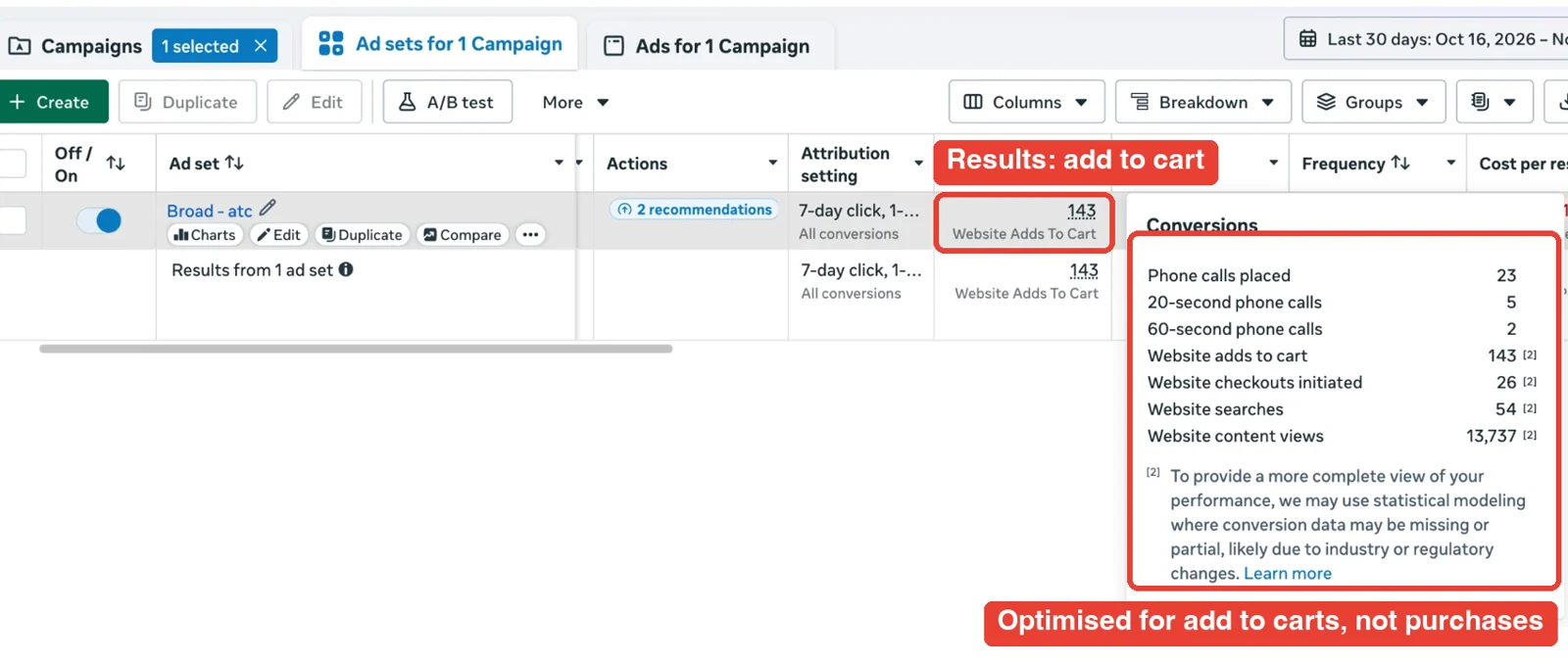
Open Ads Manager and check one thing. Your campaign objective has to be Sales and the conversion event has to be Purchase.
If it’s set to Traffic, Link clicks or Add to cart, Meta brings you exactly what you asked for: people who click, people who add to cart. Not people who buy.
2. The three numbers that tell you if your ads work
Check them in this order. Each one is built on the one before it.
Number 1: link CTR (not CTR all)
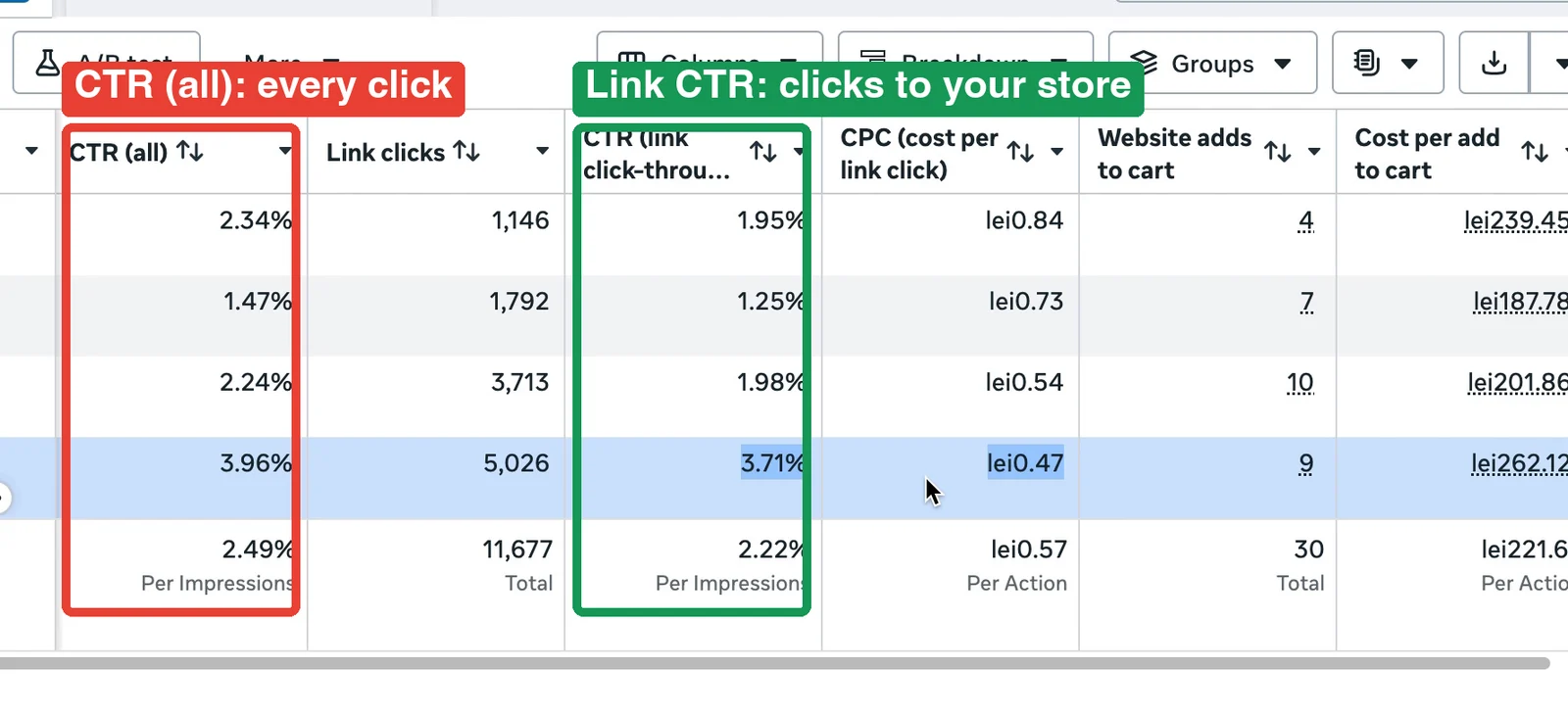
Meta shows you two click-through rates. CTR (all) counts every click on your ad: a like, a comment, opening the text. You can have a great CTR there and still almost nobody goes to your website.
The one that matters is link CTR: out of every 100 people who see your ad, how many click through to your store.
| Link CTR | What it means |
|---|---|
| Under 1% | Weak: the ad doesn’t get attention |
| Around 1.5% | Average |
| 2% or more | Excellent |
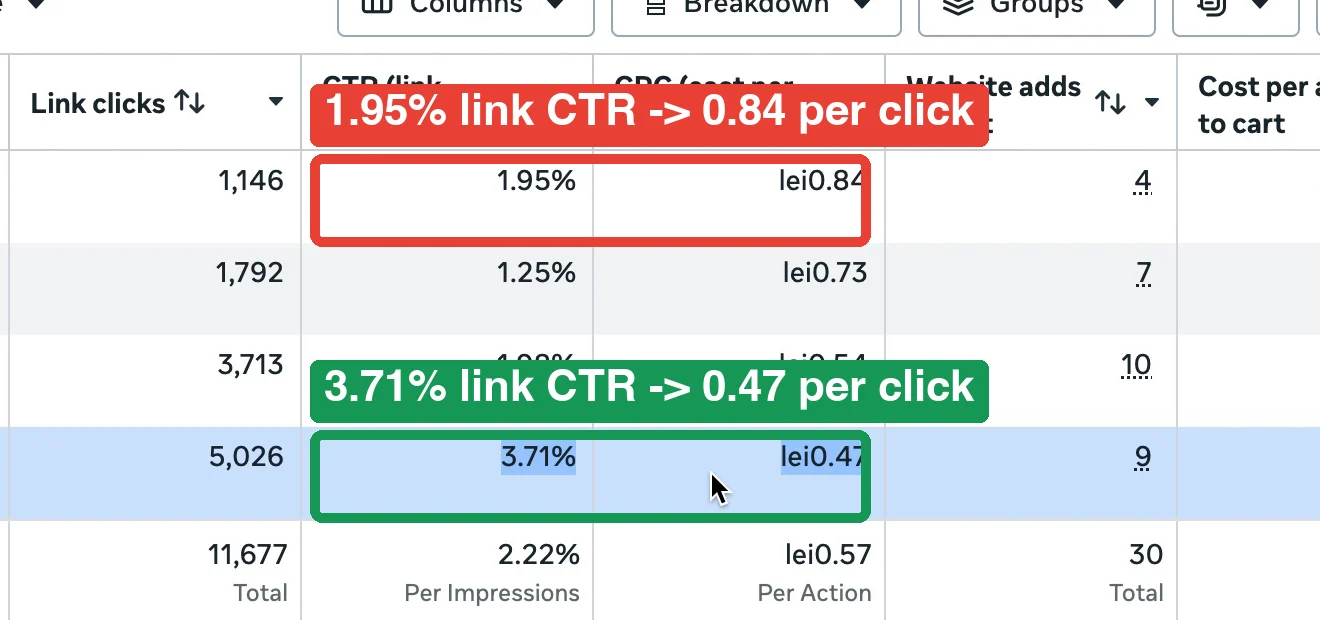
Here’s why it matters: the higher your link CTR, the less you pay for every visitor. Meta rewards ads that get attention. In my own account, the ad with a 3.71% link CTR paid 0.47 per click; the one with 1.95% paid 0.84, almost double. Same budget, a lot more visitors.
Number 2: cost per link click
On average it’s somewhere between $0.70 and $1.40. Below $1 is good.
This one number moves everything after it: your cost per add to cart, your cost per checkout, your cost per purchase. They are all built on top of what you pay for one click. Say 5 out of 100 visitors add to cart:
| Cost per click | Cost per add to cart |
|---|---|
| $1.00 | $20 |
| $0.50 | $10 |
The same goes for every checkout and every purchase after it. Half the price per click, half the price per sale. Same website, same product.
Number 3: cost per add to cart
A lot of people will tell you: let the ad run until it gets 5 sales, then decide. If you have a small budget, that can eat all your money before you learn anything.
Add to carts come much sooner and much cheaper than sales, so you can judge an ad after a few add to carts. The rule is simple: out of 10 add to carts, plan that one becomes a sale. Most stores do better than that, but plan safe.
Your maximum cost per add to cart = profit per order ÷ 10
| Example | |
|---|---|
| Product price | $200 |
| Margin | 80% |
| Profit per order | $160 |
| Max cost per add to cart | $16 |
| Ad at $10 per add to cart | Keep it running |
| Ad at $40 per add to cart | Turn it off before it spends hundreds on zero sales |
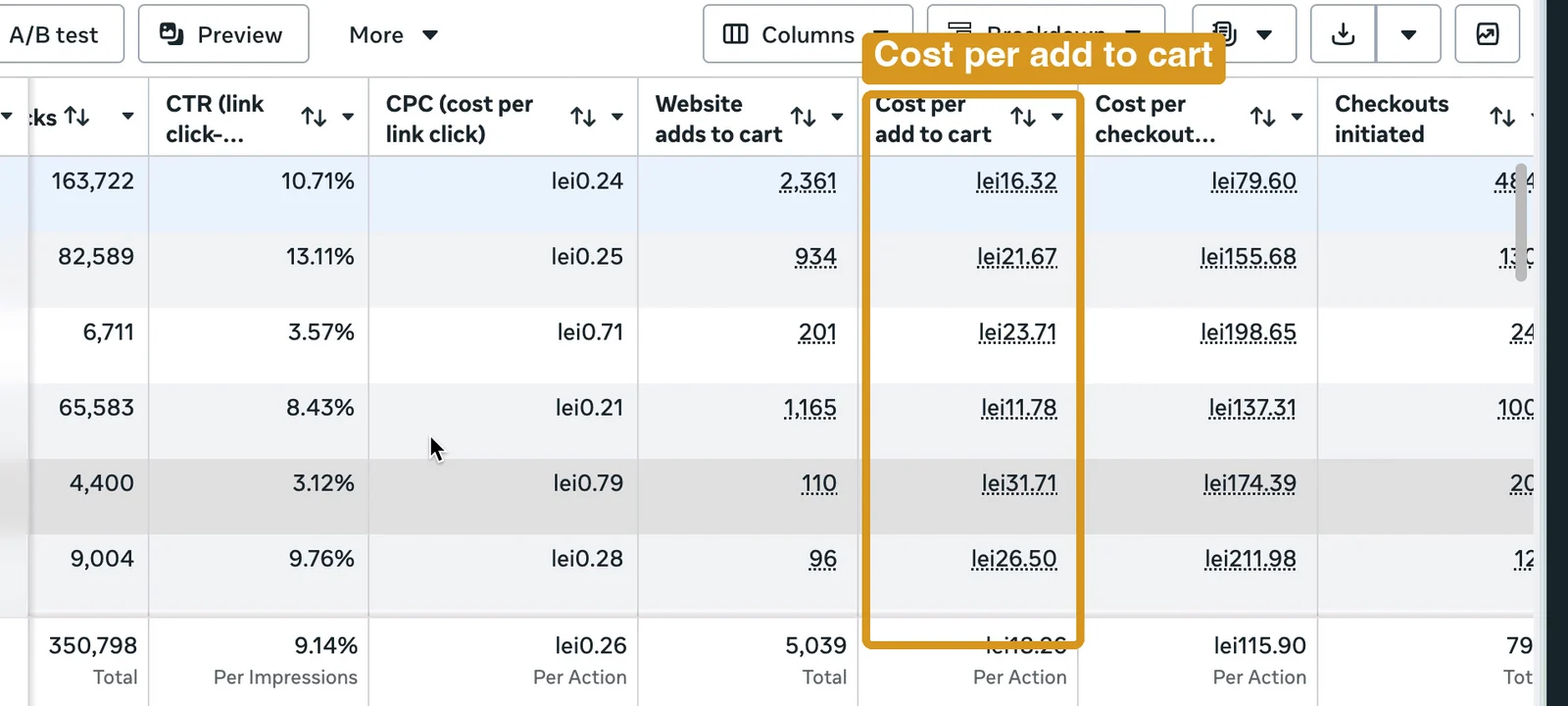
And if your link CTR and cost per click look good but your add to carts are still too expensive, the problem isn’t the ad. People are coming; they’re just not buying. Then it’s one of the other two: your website or your product.
3. Check the website: would you trust it with your money?
Ask yourself honestly: would you personally buy from your website? Then ask your family and friends: what’s their first impression? What’s missing?
Here’s a store I’m working on right now, my own. Same product, same prices. Which one gives you a better first impression? Which one would you trust with your money?
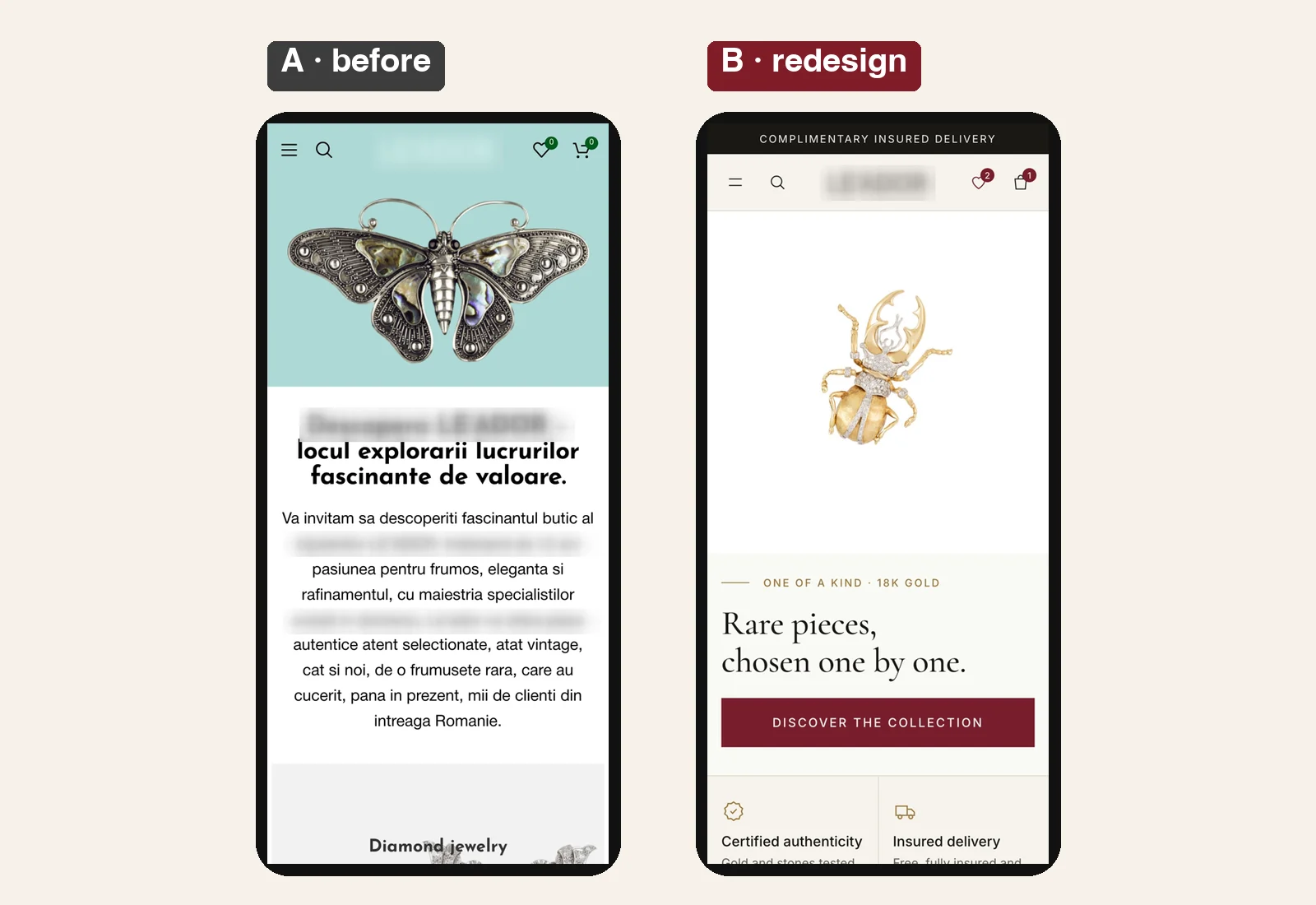
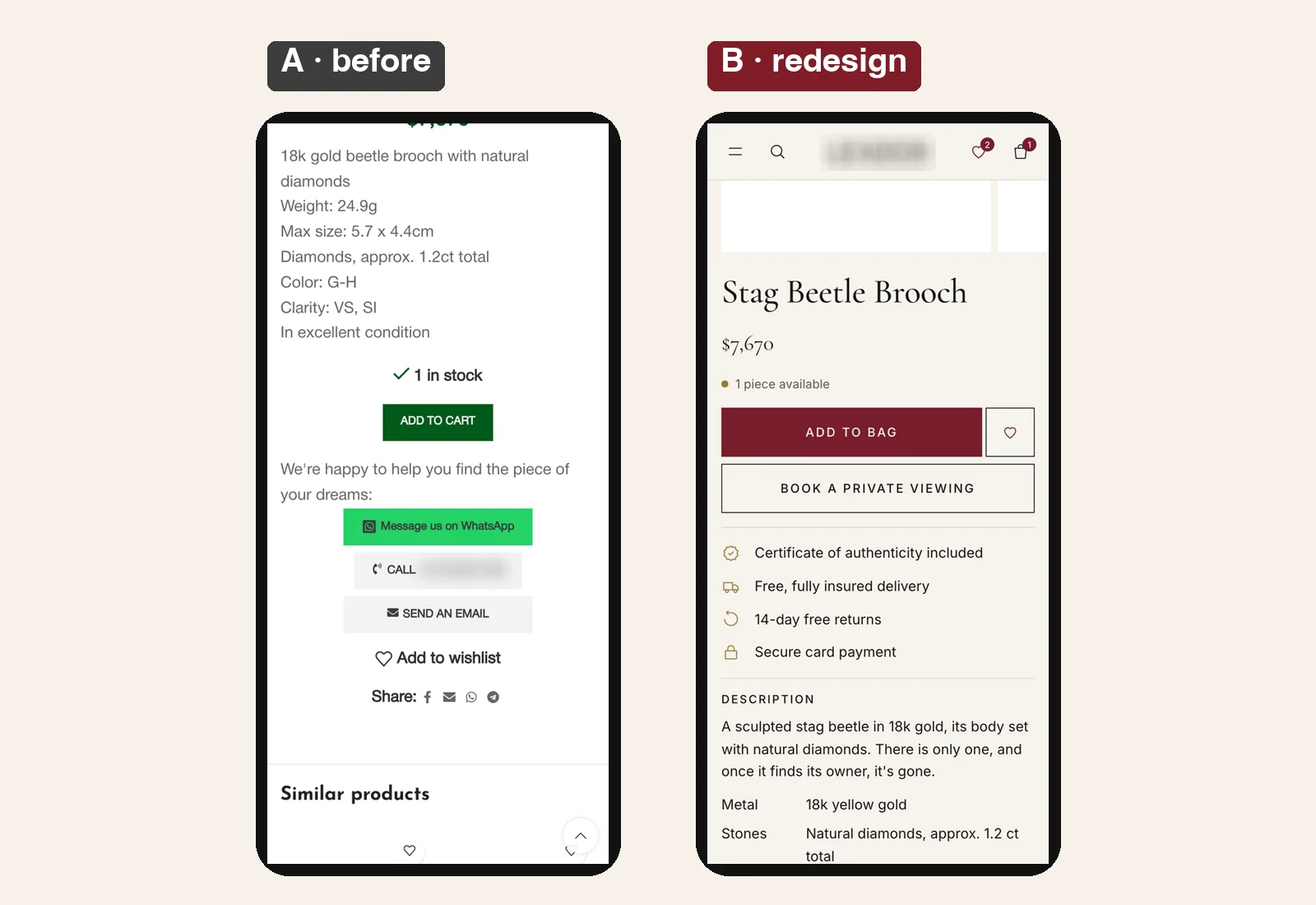
When I say every detail matters, I mean I’ve A/B tested these details for multiple brands. On one store we added two things to the homepage, a brand video and a few reviews: about $60,000 more revenue a month (the full test).
The trust checklist
Go through this list on your own store:
- Colours: two or three, not five.
- Fonts and sizes: one or two fonts, consistent sizes.
- Delivery: how long it takes and how much it costs, right next to the Add to cart button.
- Returns: clear, in one line.
- A business address: so people know there’s a real company behind the store.
- A phone number and a WhatsApp button. Most people will never call you, but just seeing a phone number tells them that if something goes wrong, someone will answer.
- Reviews: the strongest trust signal you will ever have.
When you sell a lot of products, every product has only a few reviews, sometimes none. On one client store we added two tabs on the product page: one with the reviews for that product, one with all the reviews the store ever got. Sales went up 8%, without collecting a single new review.
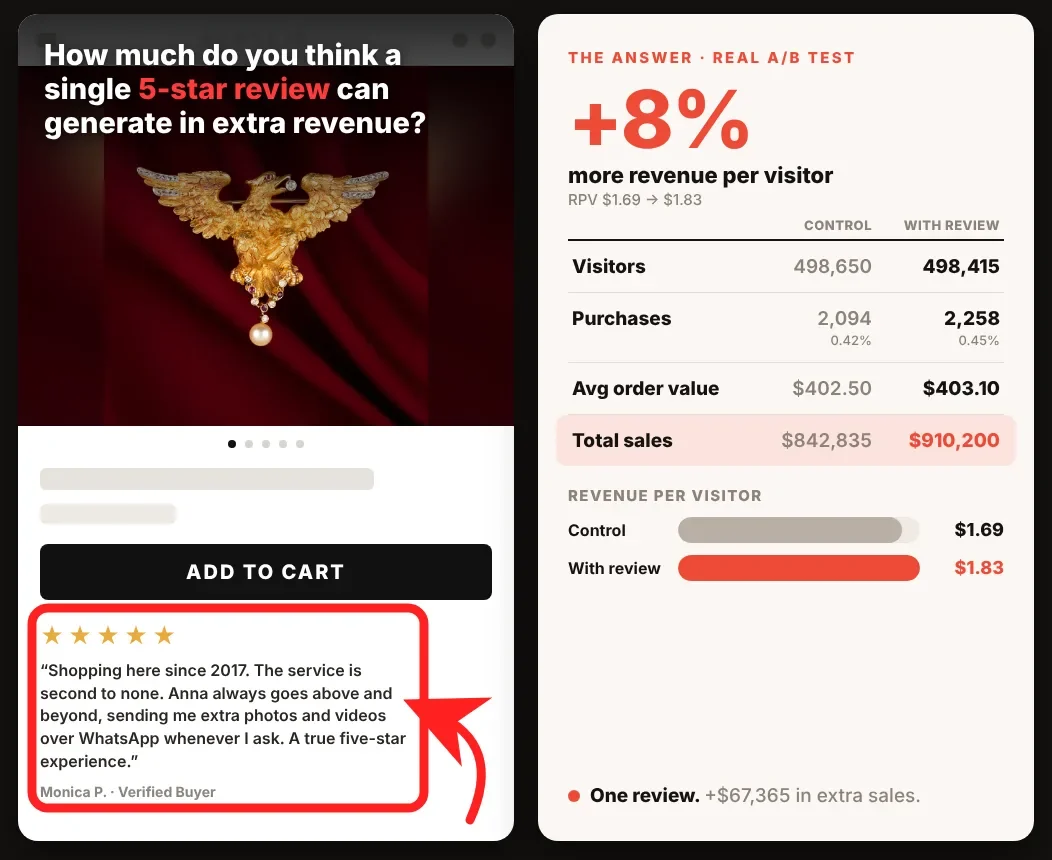
On another store, one review placed right under the Add to cart button made an extra $67,365 (the full test).
4. Check the product: photos and information
Once your first impression is sorted out, take a hard look at your product. Is it attractive? Does it look real and trustworthy? Do the title and the description give people enough information to buy?
People can’t touch your product. The photo is the product. If your photos look cheap, people think the product is cheap. So:
- use one background across the whole store;
- show the product in use, so people see the size and how it looks in real life;
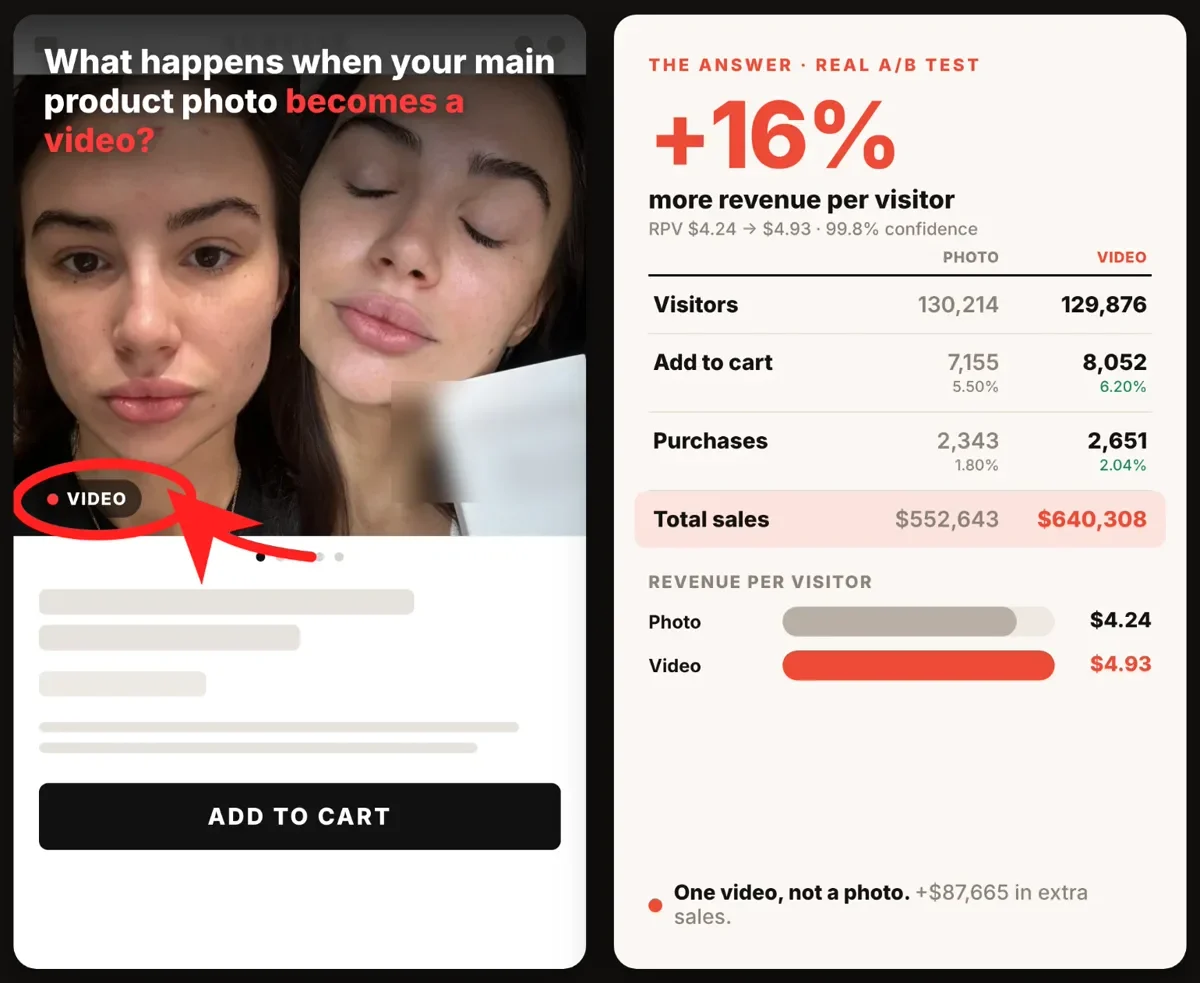
- if you can, add a short video. It shows the product better than any photo.
5. Still no profit? Fix the offer
Say your ads look good, your website builds trust, your products look great, and you still don’t sell, or you sell but lose money. Then your product, the way you sell it right now, isn’t ready for paid ads.
Look at the most successful brands. They almost all have the same three things:
- An offer that’s hard to refuse. Not one product, but a stack of products or a bundle. Instead of one t-shirt, a pack of six where people pick their own colours at a better price per shirt.
- A bigger order. A bigger order means more room to pay for ads and still make money (how to raise AOV).
- A way to bring customers back: a refill, a subscription, the next product that fits, or a membership with monthly credit. The people you already paid to get buy again, without paying for ads again.
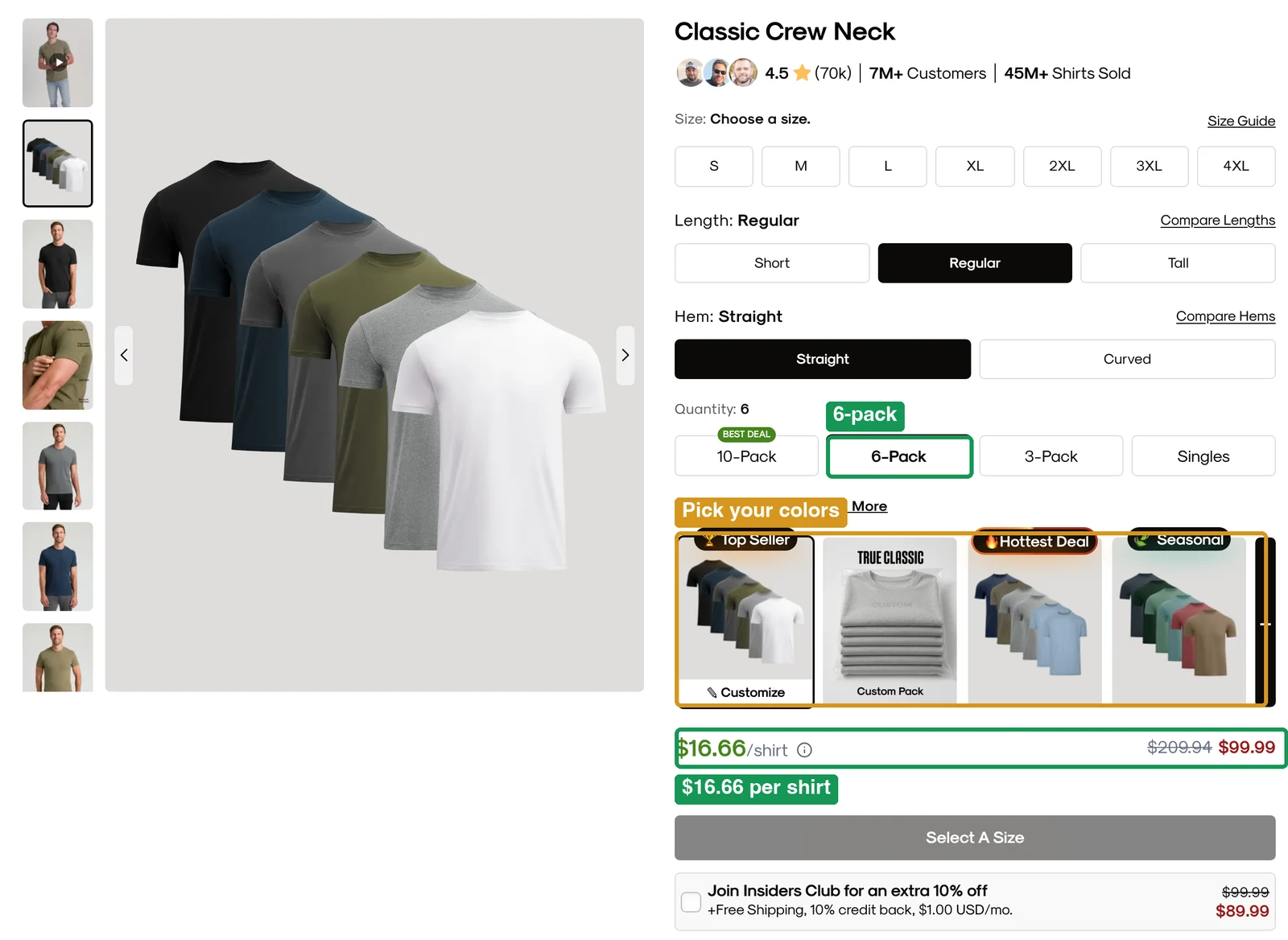
If you sell one product, with no offer and no way to get your customer back, you will most likely lose money on paid ads.
Recap: check it in this order
| Step | What to check | Pass |
|---|---|---|
| 1. The ads | Objective and event | Sales + Purchase |
| Link CTR | 1.5%+ | |
| Cost per link click | Under $1 | |
| Cost per add to cart | Under profit per order ÷ 10 | |
| 2. The website | Would you trust it with your card? | Delivery, returns, address, phone, reviews |
| 3. The product and offer | Photos, information, offer | One background, product in use, video, a bundle, a reason to come back |
So to the person with $100 left: don’t put it into more ads yet. Check these three first, fix them, and the sales will most likely start coming.
If you want to see the full system I use with brands, from finding the leaks to testing the fixes, watch my free training.
Frequently asked questions
Why does my Shopify store get traffic but no sales?
Almost always one of three things: the ads bring the wrong people (wrong objective or weak link CTR), the website doesn't build enough trust, or the product and offer aren't ready for paid traffic. Check them in that order.
What is a good link CTR for Facebook ads?
Under 1% is weak, around 1.5% is average and 2% or more is excellent. Look at link CTR, not CTR (all), which also counts likes, comments and clicks to expand the text.
How much should I pay for an add to cart?
Plan that 1 in 10 add to carts becomes a sale, so your maximum cost per add to cart is your profit per order divided by 10. If it's above that, turn the ad off before it spends hundreds on zero sales.
How long should I run an ad before deciding?
Don't wait for 5 sales on a small budget. Add to carts come sooner and cheaper, so judge an ad after a few add to carts using the profit ÷ 10 rule.
Alexander Skibinskiy
17 years in digital marketing and e-commerce. Former head of growth at Karma and Luck, a nine-figure brand, where conversion rate grew 50% in one year of A/B testing. Founder of a seven-figure e-commerce brand; 100+ brands helped since 2015. More about Alexander →
Watch the free training →